Bamini Keyboard Layout: Full Chart + How to Type Every Tamil Letter
The definitive reference for the Bamini keyboard layout — every key mapped, vowels, consonants, and compounds all in one place, plus fast-typing tips and printable resources.
The Bamini keyboard layout is an ASCII-based mapping where each standard English key produces a specific Tamil character when the Bamini font is active. There is no system-level input method to install — you simply select Bamini as your font in Word, LibreOffice, or Photoshop and start typing. This page gives you the complete map for every key, including Shift combinations.
Unlike phonetic Tamil input (e.g., Google Tamil Input or the Android/iOS Tamil keyboard), the Bamini layout is fixed — each physical key always produces the same Tamil character regardless of context. This makes it faster for experienced typists but requires upfront memorisation.
247
Tamil Unicode characters
104
Bamini key mappings (inc. Shift)
~3 wks
avg. time to memorise layout
1. Full Bamini Keyboard Layout Chart
Blue = English key label · Dark = Tamil character · Smaller text = Shift variant
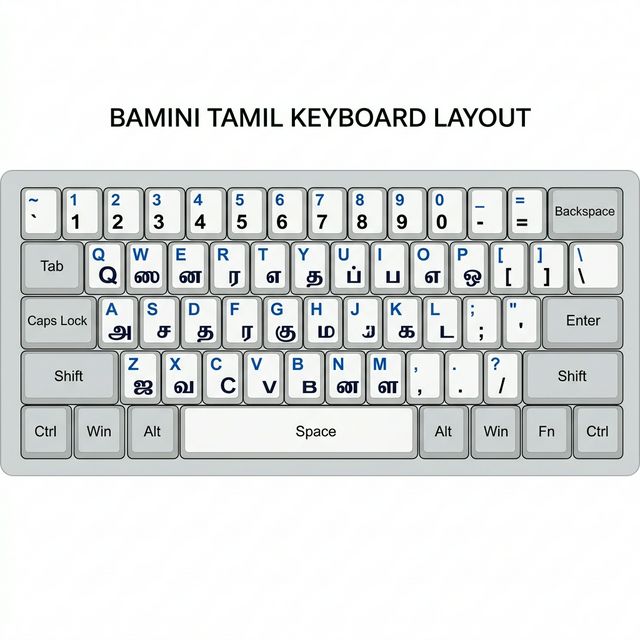
↑ Full Bamini keyboard layout — every English key mapped to its Tamil character. Right-click → "Save image" to keep a copy for reference.
Download the Bamini Font — Start Typing Today
The Bamini.ttf font file is free, ~80 KB, and works on Windows, macOS & Linux. Download it, install it, and use this page as your reference chart.
2. Complete Key Mapping Table
Every Bamini key listed alphabetically by English character, with category and pronunciation notes.
| English Key | Tamil Character | Category | Pronunciation Note |
|---|---|---|---|
| a | அ | Vowel | Short a |
| A (Shift+a) | ஆ | Vowel | Long aa |
| i | இ | Vowel | Short i |
| I (Shift+i) | ஈ | Vowel | Long ii |
| u | உ | Vowel | Short u |
| U (Shift+u) | ஊ | Vowel | Long uu |
| o | ஒ | Vowel | Short o |
| O (Shift+o) | ஓ | Vowel | Long oo |
| q | ஓ | Vowel | Alt long oo |
| g | க | Consonant | ka |
| c | ச | Consonant | cha/sa |
| d | ட | Consonant | Ta (retroflex) |
| t | த | Consonant | tha |
| p | ப | Consonant | pa |
| b | ப | Consonant | pa (alt) |
| n | ந | Consonant | na |
| N (Shift+n) | ண | Consonant | Na (retroflex) |
| m | ம | Consonant | ma |
| y | ய | Consonant | ya |
| r | ர | Consonant | ra |
| l | ல | Consonant | la |
| L (Shift+l) | ள | Consonant | La (retroflex) |
| v | வ | Consonant | va |
| z | ழ | Consonant | zha (unique Tamil) |
| w | ற | Consonant | Ra (hard) |
| e | ன | Consonant | na (alveolar) |
| s | ஸ | Consonant | sa (Grantha) |
| j | ஜ | Consonant | ja (Grantha) |
| h | ஹ | Consonant | ha (Grantha) |
| f | ப் | Compound | p + pulli (pulli = dot) |
| k | க் | Compound | k + pulli |
| M (Shift+m) | ம் | Compound | m + pulli |
3. Tips for Fast Bamini Typing
Anchor on the home row
a, s, d, f, g, h, j, k, l are your most used Tamil characters. Keep your fingers on them and reach out from there — same principle as English touch-typing.
Consonant first, then vowel mark
In Bamini, type the base consonant key, then the vowel modifier immediately after. For க + ா (kaa), type g then G (Shift+g). Internalise this pattern early.
Print this page and stick it up
Visual reinforcement is the fastest way to memorise. Print the keyboard chart section and tape it above your monitor for the first 2–3 weeks.
15-minute daily sessions beat cramming
Short, consistent practice (15–20 min/day) builds muscle memory far faster than occasional long sessions. Use a Tamil typing test site to track WPM.
Start with high-frequency letters
Learn த (t), க (g), ம (m), ன (e), ர (r), ல (l), வ (v) first — they appear in over 60% of Tamil words. Master these 7 keys before moving to rarer characters.
Eyes on screen, not keyboard
Once you remember a key, force yourself not to look down. Your fingers will adapt faster when touch is the only feedback. Cover the keyboard if needed.
4. Practice Words — Learn by Doing
Type these common Tamil words using the Bamini layout to build muscle memory. The Bamini keys are shown in monospace.
| Tamil Word | Meaning | Bamini Keys | Difficulty |
|---|---|---|---|
| அம்மா | Mother | mk;kh | ⭐ Beginner |
| அப்பா | Father | mg;gh | ⭐ Beginner |
| வணக்கம் | Hello | tzkf;fk; | ⭐⭐ Easy |
| நன்றி | Thank you | ed;wp | ⭐⭐ Easy |
| தமிழ் | Tamil | jkpo; | ⭐⭐ Easy |
| பள்ளி | School | gs;sp | ⭐⭐⭐ Medium |
| கடல் | Sea | fly; | ⭐⭐ Easy |
| மலர் | Flower | kyr; | ⭐⭐⭐ Medium |
| விண்மீன் | Star | tpz;kPd; | ⭐⭐⭐ Medium |
| புத்தகம் | Book | Gj;jfk; | ⭐⭐⭐⭐ Hard |
5. Virtual Keyboard & Online Tools
Prefer to type without installing the font? These tools let you type Bamini-style Tamil directly in the browser:
Branah Bamini Online Keyboard
Free · No installA full virtual Bamini keyboard you can click in the browser — great for one-time needs without font installation.
Tamil Virtual Academy Keyboard
Free · ResearchSupports multiple Tamil keyboard layouts including Bamini. Useful for cross-referencing layouts.
Lexilogos Tamil Keyboard
Free · Unicode outputOnline Tamil typing with transliteration — good for Unicode Tamil output even if your workflow normally uses Bamini.
Related Guides
Go deeper with Bamini
FancyFont Research Team
Tamil Typography & Font Specialists